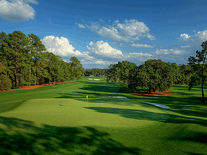
Golf Atmosphere
Taste the atmosphere of the golf sport with this slideshow screensaver. It displays high-resolution, screen-filling photos of grassy greens with golf equipment like clubs and golf balls, positioned on picture-perfect courses with views of the neighboring mountains. Music and sounds are not included, and no customizations are available.

 Free
Free  3.62 MB
  for Windows
  238
238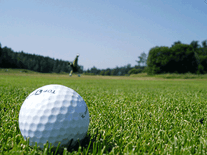


Message board
Do you have a question about this screensaver? Post it on our message board »
Installation instructions
Microsoft Windows
- Start the install program for this screensaver by double-clicking on the file you downloaded above.
- Click "Continue" to install the screensaver, then click "Finish" to close the setup wizard.
- Golf Atmosphere is now your default screensaver, and can be found among your other screensavers in Windows's Screen Saver Settings panel, where you can also watch a preview.
Anti-virus report for Golf Atmosphere
Our editors have reviewed all files and found them to be safe, but they are also checked automatically using many different virus scanners. We are happy to share the results.
| Virus scanner | golfatmosphere.exe |
|---|---|
| AVG | |
| Avast | |
| Avira | |
| BitDefender | |
| ClamAV | |
| ESET-NOD32 | |
| F-Secure | |
| Kaspersky | |
| Malwarebytes | |
| Microsoft | |
| Panda | |
| Symantec | |
| Webroot | |
| Last scanned | 2 weeks ago |
We have 1 file for "Golf Atmosphere"
- golfatmosphere.exe (Windows)
| File report #1 | |
|---|---|
| File name | golfatmosphere.exe |
| Target system | Microsoft Windows |
| File size | 3.62 MB (3,793,700 bytes) |
| File type | Portable Executable (EXE) |
| Anti-virus | |
| Detection ratio | 0/13 (0%) View report |
| Popularity | |
| Total downloads | 238 |
| Last downloaded | 1 week ago |
| File verification | |
| MD5 | de0ae778c34f61b67a575222fda2932d |
| SHA1 | 4cda6337abff7341e6fa2184a843a69192e559bc |
| SHA256 | f96fda5a87c06c5f3398f4c7eab2cf55efc6aa1abc38c7bc6a5c353b795c7067 |
User reviews (0)
No reviews have been written yet for this screensaver. Will you be the first to write one?