3D Halloween Holiday
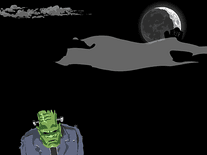
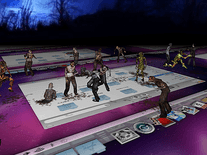
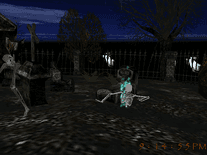
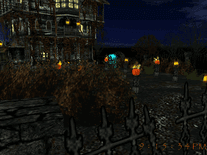
This screensaver centers on an old abandoned mansion, guarded by bats and Jack O' Lanterns on a dark Halloween night, with the moon shining bright as you navigate around the house and through the backyard. The current time is displayed in a spooky font at the bottom right corner, and in a customizable 12 or 24-hour format. Music and sound effects are included and can be toggled on/off via the screensaver's settings panel.

 Free
Free  8.79 MB
  for Windows
  5,615
5,615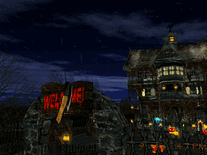
Message board
Do you have a question about this screensaver? Post it on our message board »
Installation instructions
Microsoft Windows
- Launch the install program by double-clicking on the file you downloaded above.
- Click "Next" to continue, then read the license agreement, indicate if you accept it and click "Next".
- You do not need to change the destination location or Start Menu folder, so feel free to simply click "Next" twice, followed by "Install", to begin copying all necessary files to your computer.
- Once the installer is done extracting files, it will open up the developer's website in a new browser window. You can close this window without consequence. The Screen Saver Settings panel has also been opened. Here, you will find that "3D Halloween Holiday Screensaver" is now your default screensaver.
Anti-virus report for 3D Halloween Holiday
Our editors have reviewed all files and found them to be safe, but they are also checked automatically using many different virus scanners. We are happy to share the results.
| Virus scanner | 3dhalloweenholiday.exe |
|---|---|
| AVG | |
| Avast | |
| Avira | |
| BitDefender | |
| ClamAV | |
| ESET-NOD32 | |
| F-Secure | |
| Kaspersky | |
| Malwarebytes | |
| Microsoft | |
| Panda | |
| Symantec | |
| TrendMicro | |
| Webroot | |
| Last scanned | 2 weeks ago |
We have 1 file for "3D Halloween Holiday"
- 3dhalloweenholiday.exe (Windows)
| File report #1 | |
|---|---|
| File name | 3dhalloweenholiday.exe |
| Target system | Microsoft Windows |
| File size | 8.79 MB (9,212,842 bytes) |
| File type | Portable Executable (EXE) |
| Anti-virus | |
| Detection ratio | 0/14 (0%) View report |
| Popularity | |
| Total downloads | 5,615 |
| Last downloaded | 2 weeks ago |
| File verification | |
| MD5 | ea55d8143cd46d9ea01949d9e1378e02 |
| SHA1 | 8057d0b00a1af0c436fef1fd04329f8bf44ae3f0 |
| SHA256 | 93ff7ff99f72cc3a01bf3383082e16efeb97a42837f43add8f26dff0250fe7e8 |
User reviews (5)
I fell in love with it at first look. The music was exciting. Rotation around the haunted house, the joining in on the pumpkin & ghost party was just so much fun. Then the poor skeleton not being able to put himself back together again, oh well, that's a trick lol. It appear that I need some sort of registration number so I can adjust the settings. If that is so, please tell me how to go about that before I run out of money. :). I going to try a couple of other of you screensavers too. WTG!!!!! PS....I found that I didn't need a registration number after all to get to the settings. Again that you for a great screensaver!!!!

for me it nearly crashed my pc and was just a black screen, sad.

it is neat looking
i'm spellbound
Top notch, ay!