Dream Aquarium
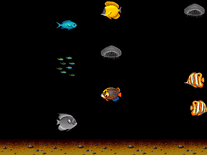
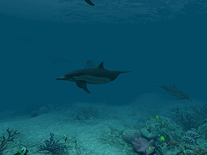
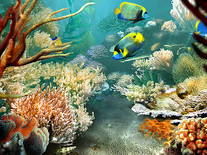
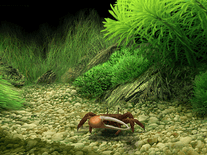
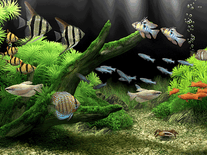
Realistically rendered fish and other sea creatures inhabit this virtual dream aquarium screensaver, designed by an Academy Award-winning effects artist. Shifting rays of light, ripples and an animated environment add to the realism. A fiddler crab chases the fish while cleaning the bottom of the aquarium, and there's support for multiple monitors, widescreen formatting, and more than twenty-three species of fish, each with well-articulated fins and animated eyes and gills. Settings are adjustable without exiting the screensaver.
Now available: Dream Aquarium 2 (Windows)

 19.95 USD
  8.28-18 MB
 for Windows, Mac
  70,769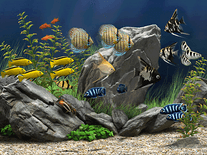
Message board
Is your question not listed? Post it on our message board »
| Subject | Replies | Last post |
| how can i purchase dream aquarium | 1 | 1 year ago |
| Video Card Lock Error | 1 | 2 years ago |
| Locks up when trying to enter licence number | 1 | 5 years ago |
| The price for the paid program allows me to install this on how many machines? | 1 | 8 years ago |
Installation instructions
Microsoft Windows
- Double-click on the trial file downloaded above to start the installer.
- If you agree to the license terms set forth, click the "I Agree" button.
- The default install location (C:\Program Files\Dream Aquarium) is fine for most users, and does not have to be changed. Click "Install" to begin copying all necessary files to your computer.
- You will be asked whether you want to have the installer create a desktop shortcut. This is not strictly necessary, but it will allow you to access the screensaver directly from your desktop.
- Click "Yes" if you want to make Dream Aquarium your new default screensaver.
- The installation will be completed and Windows's Screen Saver Settings panel will open.
Anti-virus report for Dream Aquarium
Our editors have reviewed all files and found them to be safe, but they are also checked automatically using many different virus scanners. We are happy to share the results.
| Virus scanner | DreamAquariumXP.exe | DreamAquarium_1.296.18.dmg |
|---|---|---|
| AVG | ||
| Avast | ||
| Avira | ||
| BitDefender | ||
| ClamAV | ||
| ESET-NOD32 | ||
| F-Secure | ||
| Kaspersky | ||
| Malwarebytes | ||
| Microsoft | ||
| Panda | ||
| Symantec | ||
| TrendMicro | ||
| Webroot | ||
| Last scanned | 1 week ago | 1 week ago |
We have 2 files for "Dream Aquarium"
- DreamAquariumXP.exe (Windows)
- DreamAquarium_1.296.18.dmg (Mac)
| File report #1 | |
|---|---|
| File name | DreamAquariumXP.exe |
| Target system | Microsoft Windows |
| File size | 8.28 MB (8,684,083 bytes) |
| File type | Portable Executable (EXE) |
| Anti-virus | |
| Detection ratio | 0/14 (0%) View report |
| Popularity | |
| Total downloads | 59,543 |
| Last downloaded | 2 hours ago |
| File verification | |
| MD5 | dff323fefe075cc604085711a7985d2d |
| SHA1 | ac95161c1e675a8eb6102f339fcae52e02f5659b |
| SHA256 | 6b25587b499327f1cba1a2b592a378ebb93079e5e65b3202a9a0453a8c436a36 |
| File report #2 | |
|---|---|
| File name | DreamAquarium_1.296.18.dmg |
| Target system | Apple Mac |
| File size | 18.00 MB (18,874,368 bytes) |
| File type | Apple Disk Image (DMG) |
| Anti-virus | |
| Detection ratio | 0/14 (0%) View report |
| Popularity | |
| Total downloads | 11,226 |
| Last downloaded | 11 hours ago |
| File verification | |
| MD5 | d8b470cdf731246ba786df57f2bf0051 |
| SHA1 | a9451b3fe1323ee92e1946dded63cbb52c4a3a08 |
| SHA256 | 7b3ef1416092865f72cefcfa6656035d69ea8ea9c4b1986d22604bbd75768a1d |
Editor's review
A highly-realistic virtual aquarium designed by an Oscar-winning animator

Designed by Alan Kapler, a special effects artist and animator who has previously worked on Hollywood blockbusters such as Titanic, X-Men and The Day After Tomorrow, Dream Aquarium is one of the most realistic freshwater aquarium screensavers on the market.
Inspired by his love of fish, Kapler, who was honored with an Academy Technical Achievement Award in 2005 for a software program he developed, left Hollywood to work on Dream Aquarium, which he first released in 2006 and is still actively developing.
Continuous development is made possible by the fact that Dream Aquarium comes with the small price tag of $19.95 (payable via credit card or PayPal). Twenty percent of profits are donated to environmental charities, with a focus on habitat and wildlife conservation, as well as climate change and alternative energy sources, and a free demo version with limited options and nag-screens is available for anyone who wants to try before they buy.
What the money gets you is a virtual tank with 27 species of fish – as well as a fiddler crab cleaning the bottom of the aquarium – that behave much like their real-life counterparts: they peck at objects, eat food, chase each other, swim in schools, and even poop! Additional species, from the Red Tiger Discus to the Long-Finned Rosy Barb, can be purchased separately for $2 each, or as a pack containing all 10 species for $8.
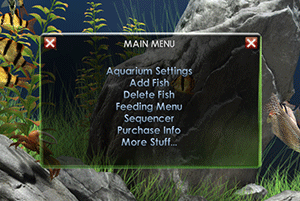
The screensaver’s settings menu, accessible via the Screensaver Settings Panel in Windows or the Screen Saver panel in OS X, allows you to protect your tank from changes being made by other users, set the maximum number of fish to allow in the tank, as well as their size, and customize various graphics settings. Most of the options, however, can be accessed by hitting the Enter key on your keyboard while Dream Aquarium is running. From there you can change the composition of your tank, feed the fish with "byte-sized" food for virtual fish, add new species, and alter numerous other behaviors.
By default, the camera position is static, showing you the full aquarium, but you can opt to have it follow one fish in particular, or several fish chosen randomly. You can adjust the air bubbles floating up to the surface, along with the speed of the fish, and even the background image can be replaced with any image on your hard drive, like a family photo.
Unless you tell it not to, Dream Aquarium will automatically connect to the internet to look for updates, such as bug fixes and improvements, once every three months. To spare your laptop’s battery, the screensaver will not run unless you have your laptop plugged into a power outlet, though this behavior, too, can be customized.
With full multi-monitor support, realistic sound effects of air bubbles and trickling water, and an active online support forum, Dream Aquarium well-deserves a 5-star rating.
User reviews (48)
ok

Does not work properly on 2019 mac air :( (shows in preview, not on actual screen)

i love it
I dared to install Dream Aquarium 3D and Registered and there went underwent into a problem while registering. I couldn't register the whole trilogy. If I do in Windows 8.1 again, then that will also work.
I like it
Paid the $20 dollars and for several months afterward I considered it money well-spent. Then, I began to see a "red screen of death" with increasing regularity. I tried all of their bug fixes, including an uninstall. Nothing has worked. Oh, well. $20 for approximately 9 months of use isn't so bad (I'm kidding, it sucks). Running Ventura 13.4.1 (c) on an Apple M1 Pro.
don't know yet
Why is not running with MAC OS?
I love it could set here all day watching it
i love it
Its good, But Crash the win 11 and frozen the machine, Send few emails to customer service , no one responded. Not recommended for win 11. Because it is not working for me. as I installed few times.
I have bought this version a couple of years back and now it still works perfectly on the newest Windows 11. What is lacking is the introduction of the new variety of fish. I would love to see more fish over on sales such as Siamese fighting fish (Betta), Guppy and Arowanas (Red, Gold, Silver). I had seen many Customers suggest on their Forum, but it seems that the Author was no longer active.
This is the best virtual fishtank out there, the fish move like the real thing. A friend of mine who maintains fishtanks for a living had to do a double-take when he first saw it. Well worth the tiny $20, and some of that goes to charity. Buy it. Even with the minor hitches on some platforms, it's worth it.
It is very nice but the demo version on Windows 10 changes my screen color temperature and makes it way too bright. It is ok for the screensaver to do this for itself but it should go back to my settings after it stops running.
nice
best
GOOD
its nice
the free version slows down the pc a lot which does not happen with other types of screensaver and after showing different types of aquarium there are only 2 fishes to swim on the black screen without showing the background of the aquarium itself so I deleted it after a short time and it was a real disappointment ....
NICE
i like aquarium
is wonderful
really good! but needs options to turn sound off, and needs to slow the action a bit -- too fast, not relaxing
amazing
Been using the paid version of this for years, I absolutely love it!
very nice relaxing
It is an amazing screen saver however it only works on earlier versions of windows such as vista and xp. Crashes anything later than that especially windows 10. Beware.
Screensavers Planet: We tested it to work on computers running Windows 7, 8 and 10. It has never crashed. There may be a compatibility issue with your computer.
I have owned this screen saver for 12 years. I have installed it on over 25 computers including all the computers at my business. The people complaining about nag screens in the free version just need to pay the price which is WELL worth every penny. Since there is a limited amount of computers licened by the $19.95 fee I have GLADLY paid for this screen saver 4 times. The person on one site that compained there was no control of the screen saver timing and sleep mode needs to go to their PC settings where there is full control of all screen savers, including Dream Aquarium. For the people who complain that it does not work in windows 10, get a geek to fix it for you. I have had this screen saver on every PC OPSYS since Windows 7, including Windows 10 for the past 2 or 3 years.
BTW this is AWESOME on multi-screen setups. The fish swim in and out of all three screens on my home desktop.
Is the best
Look nice and awesome ! but let's Try...
Doesn't work on Mac OS X
LOVE IT
$20 for a screensaver. nuf sed.
terrible, on my win 7 PC it maxed out my CPU and win 10 it crashes.
Awesome
Annoying unless you want to purchase the full version for $19.99. I'm sure the full version is awesome, but give me a few minutes to enjoy the free version before you start throwing pop ups in my face. And it doesn't specify, but I wonder if they have their website at the bottom in the paid version.
I love it! very relaxing!!!!
cool
Nice looking aquarium, great graphics! Would love to purchase the full version but they donate 20% to charities and causes that I do not agree with... bummer!
hate free sreen saver that have popups
very impressive love the depth and the vibrant colors
It's cute
Does not work well with Windows 10
Beautiful
Wonderful
demo version. limited useability.
Fair, Tell me how to get rid of it
Screensavers Planet: To uninstall the Dream Aquarium screensaver, please see our help page How to remove (uninstall) a screensaver for step-by-step instructions.