3D Bungalow Aquarium
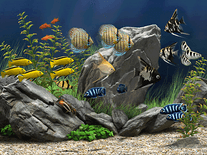
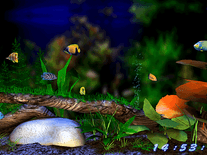
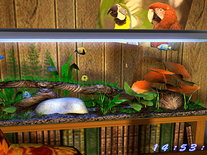
Turn your screen into a quiet bungalow on a tropical island, with a cozy hammock, arm-chair, and a view of the sun setting over the ocean. The viewpoint slowly pans toward the aquarium, where variously colored fish swim among underwater plants, rocks and branches, all rendered in 3D. You can choose to display the full bungalow with aquarium, or the aquarium alone. Also included are full stereo music, and a digital clock at the bottom-right.

 19.95 USD
  5.97 MB
  for Windows
  1,627
1,627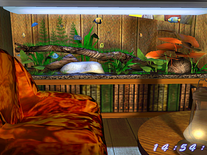
Message board
Do you have a question about this screensaver? Post it on our message board »
Installation instructions
Microsoft Windows
- Double-click on the 3dbungalowaqua.exe file you downloaded to start the installer.
- Click "Next" to proceed, then indicate if you accept the license agreement, and click "Next".
- Click "Next again, unless you want to change the default destination location, then click "Next" once more, unless you want to change the name of the Start Menu folder that will be created.
- Now click "Install" to copy the screensaver to your computer.
- After a few seconds, the installer will have completed, and you can click "Finish" to exit.
- The Screen Saver Settings panel will open. "3D Aquarium Bungalow" is now your default screensaver.
Anti-virus report for 3D Bungalow Aquarium
Our editors have reviewed all files and found them to be safe, but they are also checked automatically using many different virus scanners. We are happy to share the results.
| Virus scanner | 3dbungalowaqua.exe |
|---|---|
| AVG | |
| Avast | |
| Avira | |
| BitDefender | |
| ClamAV | |
| ESET-NOD32 | |
| F-Secure | |
| Kaspersky | |
| Malwarebytes | |
| Microsoft | |
| Panda | |
| Symantec | |
| TrendMicro | |
| Webroot | |
| Last scanned | 2 weeks ago |
We have 1 file for "3D Bungalow Aquarium"
- 3dbungalowaqua.exe (Windows)
| File report #1 | |
|---|---|
| File name | 3dbungalowaqua.exe |
| Target system | Microsoft Windows |
| File size | 5.97 MB (6,259,472 bytes) |
| File type | Portable Executable (EXE) |
| Anti-virus | |
| Detection ratio | 0/14 (0%) View report |
| Popularity | |
| Total downloads | 1,627 |
| Last downloaded | 1 week ago |
| File verification | |
| MD5 | 718fc906045d8b84e3b248737a517326 |
| SHA1 | aafc58555e4966da098e20f8cea7854ba0032353 |
| SHA256 | ff64a0dcdbc0d0d77233bee0e55964ee64ab0129f0ae276486f92535e0389eb6 |
User reviews (2)
It is very cool and pretty

I Like it thank you very much. as the user of windows always waiting for the new release about screen saver and wallpaper too.