Active Volcano 3D
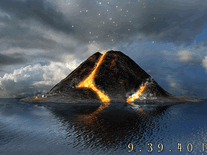
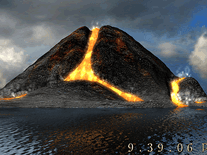
Watch as this 3D-rendered volcano erupts on your screen, spilling hot lava into the ocean and spitting fire into the sky. This screensaver shows the action from various angles, moving away from or rotating around the volcano, while conveniently displaying the time in digital format (12h or 24h) at the bottom right of your screen.

 Free
Free  4.87 MB
  for Windows
  3,622
3,622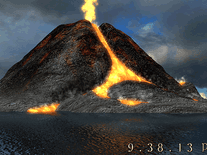
Message board
Do you have a question about this screensaver? Post it on our message board »
Installation instructions
Microsoft Windows
- Double-click on the file you downloaded to bring up the Screensaver Setup Wizard.
- Click "Next" to continue, then indicate if you accept the license agreement before clicking "Next" again.
- The default destination location for this screensaver ("C:\Program Files\Active Volcano 3D Screensaver") should be fine for most users. The same goes for the Start Menu folder, so simply click "Next" twice.
- Now click "Install" to begin copying all necessary files to the destination folder.
- After a few seconds, the installer will automatically exit and open up the developer's website in your default web browser. You can close that browser window without consequence.
- Windows's Screen Saver Settings panel will also have been opened. Here you will find that "Active Volcano 3D Screensaver" is now among your other screensavers, and has been set as your default screensaver.
Anti-virus report for Active Volcano 3D
Our editors have reviewed all files and found them to be safe, but they are also checked automatically using many different virus scanners. We are happy to share the results.
| Virus scanner | activevolcano3d.exe |
|---|---|
| AVG | |
| Avast | |
| Avira | |
| BitDefender | |
| ClamAV | |
| ESET-NOD32 | |
| F-Secure | |
| Kaspersky | |
| Malwarebytes | |
| Microsoft | |
| Panda | |
| Symantec | |
| TrendMicro | |
| Webroot | |
| Last scanned | 1 week ago |
We have 1 file for "Active Volcano 3D"
- activevolcano3d.exe (Windows)
| File report #1 | |
|---|---|
| File name | activevolcano3d.exe |
| Target system | Microsoft Windows |
| File size | 4.87 MB (5,107,900 bytes) |
| File type | Portable Executable (EXE) |
| Anti-virus | |
| Detection ratio | 0/14 (0%) View report |
| Popularity | |
| Total downloads | 3,622 |
| Last downloaded | 2 days ago |
| File verification | |
| MD5 | d32014108684d5fba7cc8e9bf2084d7e |
| SHA1 | b2f6c9011e6201566eba7756a9c17b11d400b032 |
| SHA256 | 7e31cf65eeb5f0862d4f67214b7101054f360092a727cd3a5a4ffbc1e2de3017 |
User reviews (4)
I like this. I googled it and found the same volcano to use as a desktop background. Cool!!!

by Joseph on October 22, 2015
really bad

by robin2456 on August 14, 2015
This is fantastic! The graphics are so realistic.
by Pam on April 16, 2015
EXELENT
by MARLON on February 12, 2015